Know why you’re calling.
Work through due calls with contact history, local time, and your script in view. Ask Vee to personalize the talking points before you dial.
Explore cadencesVesso Dialer
Spend the call on the customer, with their context close by. Call from your outreach queue, use Vee’s suggestions and carry the outcome into a clear follow-up.
Free for 7 days · No credit card required
From “hello” to what happens next.
See how the conversation stays connected to the customer.
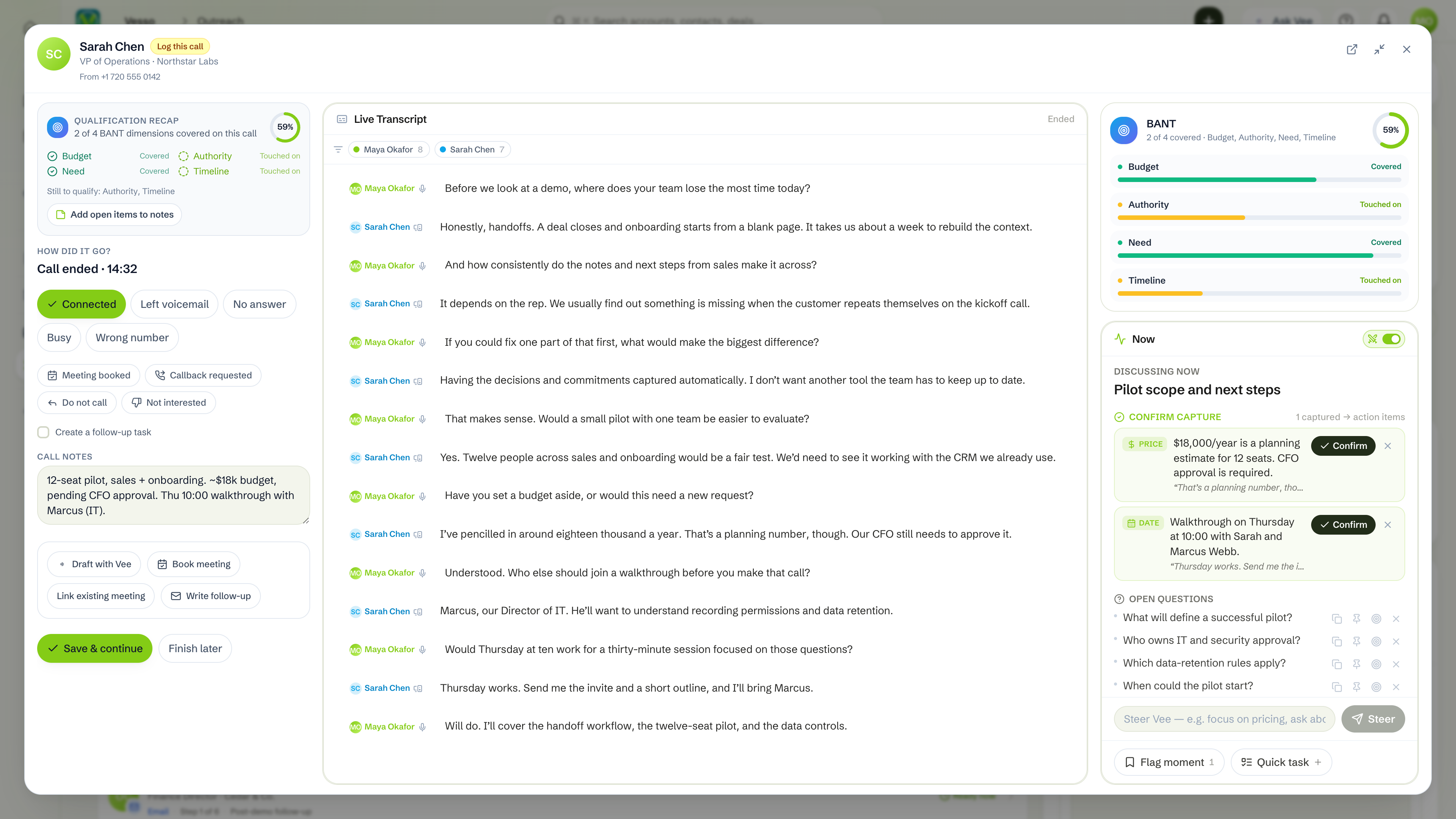
Revisit the transcript, Vee’s notes and the agreed follow-up from the customer conversation. Keep the next rep from starting over.
Outreach Phone call Contact timeline Next step
The number, the reason to call, and the next action already belong together. Vesso keeps them that way.
Keep the call dock beside your work. Take notes as you talk, open the transcript, or switch to Vee without leaving the conversation.
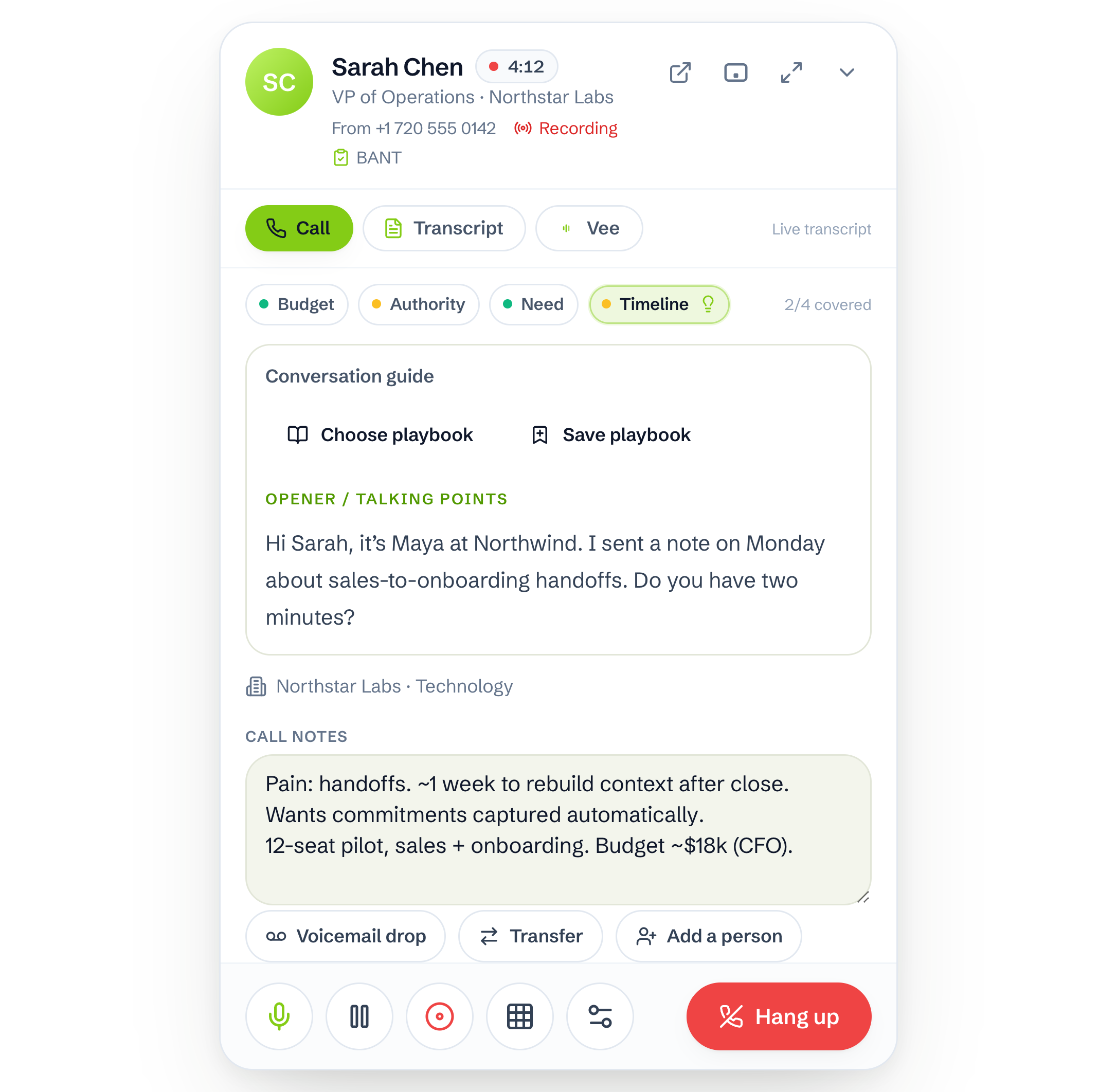
Work through due calls with contact history, local time, and your script in view. Ask Vee to personalize the talking points before you dial.
Explore cadencesFollow the live transcript and Vee’s suggestions. Keep battle cards close, bookmark a moment, or create a task while the context is fresh.
Meet your AI copilotLog the outcome and your notes to the contact’s timeline. Continue the cadence, schedule a callback, or pause for a booked meeting.
Explore call outcome rulesExpand the call to bring your notes, transcript, and Vee insights together. Review what Vee captured and the open questions, then log the outcome with the details still in front of you.
Incoming calls bring matching contact or account details into view. Pick up in Vesso, with the context that makes the conversation feel like a continuation.
VP of Sales · Northstar
Matched to your contactInterested in simplifying rep follow-up.
Your last call note“Hey, it’s Alex. I’ve got a few minutes to talk through that workflow. Give me a call back.”
Example voicemail transcriptIllustrative caller details and message
Set up your number and call preferences once. Your team can get back to the people on the other end.
Find an available workspace number and set the caller ID your contacts will see.
Manage recording, the consent announcement, and your team’s inbound routing.
Select your microphone and speaker, place a test call, then open your outreach queue.
Everything around making the call.
Yes. Call from a contact or a call step in your outreach queue, using your browser and microphone. Your workspace needs calling enabled, an available caller ID number, and enough credits. The call dock keeps the conversation in Vesso as you work.
Start the call from the current outreach step, then log the outcome and your notes. The call playbook can continue, retry, pause, end, or move the contact to another active cadence. For a callback, choose a date and time: Vesso reschedules the current call step rather than completing it. “Meeting booked” pauses outreach; “Do not call” suppresses the number and ends the cadence.
With live transcription turned on, you can follow the transcript and see Vee’s suggestions alongside the call. The dock also supports battle cards, bookmarked moments, and quick tasks linked to the contact. Live transcription depends on browser support.
Yes. Configure inbound routing for your workspace numbers, then receive calls in Vesso with matching contact or account context. Unanswered calls can go to voicemail. Voicemail includes playback and a transcript when processing is complete, so you can review the message and call back.
Your workspace’s recording policy controls this. Admins can enable an announcement, manage the consent message, or turn recording off. Recording is subject to your workspace’s recording allowance; a call can still proceed when that allowance is exhausted. Live transcription has a separate user preference.
Calling uses workspace credits, and phone numbers have a recurring monthly credit cost. Recording also uses your workspace’s recording allowance. You can review current usage and available numbers in Vesso. Supported calling destinations and number availability are shown in your workspace’s phone settings.
Bring calls, context, and follow-through into Vesso.
Free for 7 days · No credit card required