Describe the work once.
Ask Vee to prepare a regular brief or watch for a supported condition. Review the proposed instructions, timing and scope, or choose a starter from the Routines tab.
Vee Routines
Turn a recurring request into standing work. Give Vee a schedule or a condition to watch, then review what it finds and prepares.
Free for 7 days · No credit card required
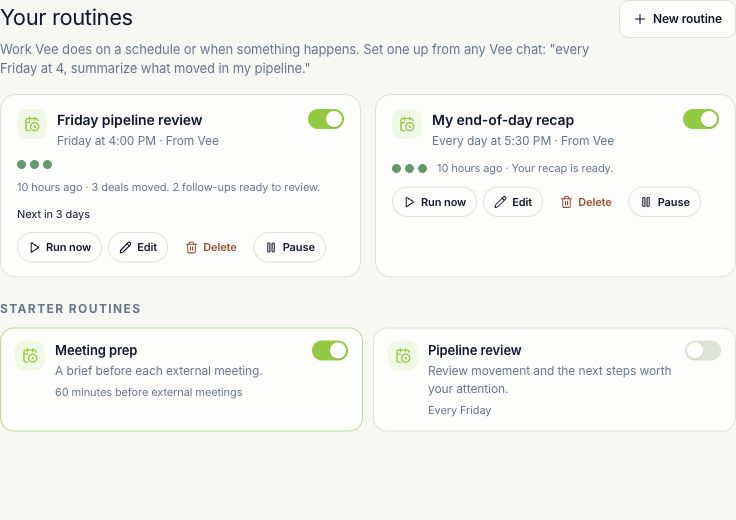
See your routines, their timing and their latest results together. Pause or change the work when your priorities change.
Give good work a rhythm
Make the repeatable part of your day easier to run, inspect and stop.
Ask Vee to prepare a regular brief or watch for a supported condition. Review the proposed instructions, timing and scope, or choose a starter from the Routines tab.
Arm a proposed routine when you are ready. Use a schedule for recurring work or a watcher for supported conditions. Run a scheduled routine now when you need an early look.
Open the latest result and inspect proposals in context. Pause a routine when priorities change, resume it later, or delete it when the work is finished.
Control stays close
Routines start in suggest mode. A recurring request still works within the actor’s permissions and the workspace’s execution controls.
Explore trust and securityA proposed routine needs to be armed. Enabling a starter arms it directly, so inspect its instructions and timing first.
Inspect plans, prepared changes and batch proposals. Confirm the specific actions you want to apply and read the result of each.
Pause future runs or delete the routine. Supported completed actions expose a time-limited undo; stopping a routine does not undo earlier work.
Before you begin
Routines require the Vee workspace and the backing service to be enabled. Supported conditions, AI credits, run limits, role permissions and workspace policies constrain what can run. A watcher is not a promise of instant notification.
Open the setup guideMake it work for you
Practical steps, exact controls, and answers when something needs attention.
A few useful details
A schedule runs at the configured cadence and timezone. A watcher responds when a supported workspace event matches its filters. Duplicate-event suppression and delivery controls can prevent a repeated response.
Routines start in suggest mode. Execution also depends on the action type, permissions and policy. Some low-risk actions can execute directly elsewhere in Vee, and explicitly configured autopilot can change handling for selected tools. Review your workspace’s settings.
Yes. Pause stops future eligible runs until you resume it. Delete removes the routine. Neither action reverses completed work or guarantees cancellation of work already underway.
A supported batch can expose one undo action for its reversible items within ten minutes. Some actions have no undo, and individual reversals can fail or be skipped. Inspect the affected records afterward.
Put your context to work
Bring a real customer, a recurring task, or a conversation worth remembering.
Free for 7 days · No credit card required