Review the possible match.
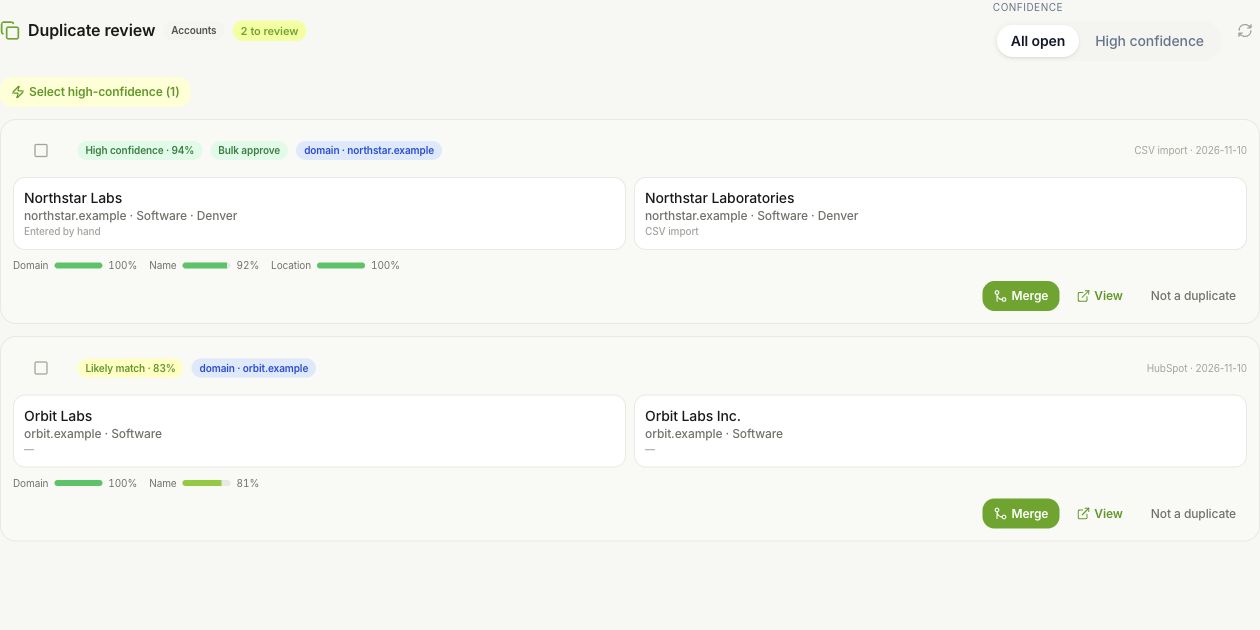
Inspect account or contact candidates and the reasons they were matched. Compare the records before merging; similar names alone do not establish the same identity.
Identity Resolution
Review possible duplicates, decide which record to keep, and keep a ledger of the merge. Bring new data into a customer history your team can follow.
Free for 7 days · No credit card required
Compare both records and the reasons they were matched. Keep the customer history your team can trust by reviewing the evidence first.
A clearer customer record
A match is a reason to look closer. The review is where you decide.
Inspect account or contact candidates and the reasons they were matched. Compare the records before merging; similar names alone do not establish the same identity.
Select the surviving record, inspect conflicting fields and preview the affected links. Keep the values that reflect the relationship, then confirm the merge if your role allows it.
Review merge history and keep a ledger of pre-merge records and relationship moves. An eligible reversal restores supported changes while protecting subsequent user edits.
Control stays close
Good data cleanup needs an explanation you can inspect and a recovery path you can understand.
Explore trust and securityRole policy controls who can merge and reverse. Resolver configuration, backfill and rescanning require an administrator.
Reversal uses field provenance to preserve later user edits. Relationships that moved again stay where they are; inspect the restored records and their links afterward.
Account and contact matching covers supported file imports, Salesforce and HubSpot imports, inbound CDP data and manual create or edit paths. Coverage varies by source and entity.
Before you begin
Resolver mode and workspace policy affect matching and merge behavior. Reversing a Vesso merge is not an undo of an entire import and does not promise to reverse changes in an external CRM. Newer dependent merges may need to be reversed first.
Open the setup guideMake it work for you
Practical steps, exact controls, and answers when something needs attention.
A few useful details
No. Matching and merge behavior depend on the resolver mode and policy. Inspect the candidate, evidence and field choices in duplicate review before confirming a manual merge.
The workspace’s role policy determines merge and reversal permissions. Administrators also manage resolver configuration and maintenance actions. If a control is missing, ask an administrator to review your role.
Reversal protects subsequent user edits using field provenance and skips links moved since the merge. Inspect the restored records and their relationships rather than assuming an exact rewind.
No. Identity resolution applies to supported account and contact ingestion paths. An import’s other objects, provider-specific behavior and external records have their own rules.
Put your context to work
Bring a real customer, a recurring task, or a conversation worth remembering.
Free for 7 days · No credit card required